
Edit Armor Stands
Importing…Armor stands are a great way to create and pose an NPC of your very own. This is available to anyone with the Rogue premium rank (temporary or permanent) or with the Panda /ranks.
First, find yourself an armor stand (you can build one with 6 sticks and 1 smooth stone slab) and place it down.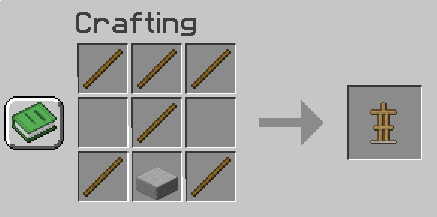
Then, put a flint in your active toolbar slot and click anywhere. It will open up the armor editing window:
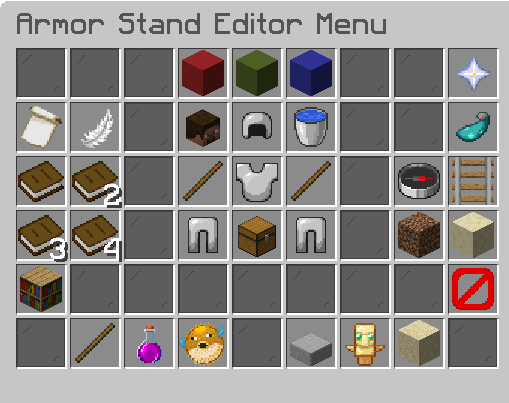
Hovering over each of the items in this menu will allow you to adjust your armor stand:
Player Head: Click this to get a copy of your head (for free!) Iron Helmet: Head Position (rotate the head) Water Bucket: Reset Pose (reset body part position to default) Left stick: Right Arm Position (rotate the right arm) Iron Chestplate: Body Position (rotate the body/torso) Right stick: Left Arm Position (rotate the left arm) Left Iron Leggings: Right Leg Position (rotate the right leg) Chest: Equipment (edit equipment -- add something for your armor stand to hold) Right Iron Leggings: Left Leg Position (rotate the left leg)
Nether Star: Help! Click this to open a help menu in your chat box, which will take you to the Armor Stand Plugin Wiki. Glow Ink Sac: Toggle Vulnerability (toggles an armor stand's vulnerability state to be invincible) Compass: Rotate (rotate the entire armor stand: the armor stand will rotate clockwise) Rail: Placement (move the entire armorstand) Dirt Block: Make coarse adjustments (make larger movements per mouse click) Sandstone Block: Make fine adjustments (make minor movements per mouse click) 🚫: Disable Slots (enable and disable equipment lock)
Stick: Show Arms (turns arms on and off) Pink Potion Bottle: Visibility (make your armor stand visible or invisible--many people use the armor stand invisible to imitate floating text) Pufferfish: Size (keep your armor stand at normal size or shrink it to baby villager size) Stone Slab: Base Plate (turn smooth stone baseplate on or off) Totem of Undying: Toggle Vulnerability (toggles an armor stand's vulnerability state to be invincible) Sand Block: Gravity (turn gravity on or off to have your armor stand go through floors, ceilings, or walls, or float in midair)
Customizing Your Armor Stand
Tips
For more information, read the Armor Stand Editor