
Edit Armor Stands
Armor stands are a great way to create and pose an NPC of your very own. This is available to anyone with the Rogue premium rank (temporary or permanent) or with the Panda /ranks.
First, find yourself an armor stand (you can build one with 6 sticks and 1 smooth stone slab) and place it down.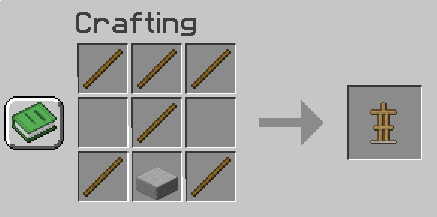
Then, put a flint in your active toolbar slot and click anywhere. It will open up the armor editing window:
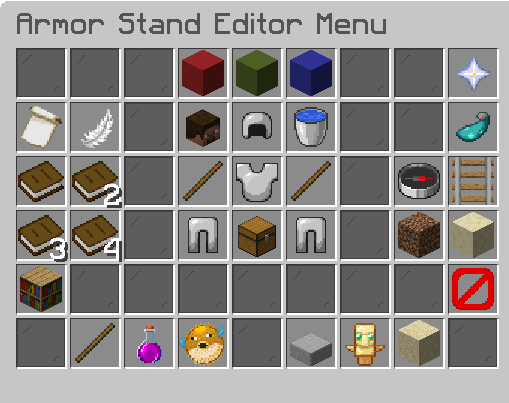
Hovering over each of the items in this menu will allow you to adjust your armor stand:
- Red Wool Block: X Axis: rotate body parts along the X Axis (moves side to side)
- Green Wool Block: Y Axis: rotate body parts along the Y Axis (up and down)
- Blue Wool Block: Z Axis: rotate body parts along the Z Axis (moves forward and backwards)
- Nether Star: Help key (you can get more info on this plugin from the Armor Stand Editor Wiki)
- Flower Charge Banner: Copy (copy the armor stand's settings to paste to another armor stand)
- Feather: Paste (paste the armor stand's settings from another armor stand)
- Book: Copy Slot 1 (select a slot to store settings -- to use this, select the Banner and click on this slot to save it. Then, open another armor stand, click on the slot and paste it to the Feather)
- 2 Books: Copy Slot 2
- 3 Books: Copy Slot 3
- 4 Books: Copy Slot 4
- Player Head: Click this to get a copy of your head (for free!)
- Iron Helmet: Head Position (rotate the head)
- Water Bucket: Reset Pose (reset body part position to default)
- Left stick: Right Arm Position (rotate the right arm)
- Iron Chestplate: Body Position (rotate the body/torso)
- Right stick: Left Arm Position (rotate the left arm)
- Left Iron Leggings: Right Leg Position (rotate the right leg)
- Chest: Equipment (edit equipment -- add something for your armor stand to hold)
- Right Iron Leggings: Left Leg Position (rotate the left leg)
- Nether Star: Help! Click this to open a help menu in your chat box, which will take you to the Armor Stand Plugin Wiki.
- Glow Ink Sac: Toggle Vulnerability (toggles an armor stand's vulnerability state to be invincible)
- Compass: Rotate (rotate the entire armor stand: the armor stand will rotate clockwise)
- Rail: Placement (move the entire armorstand)
- Dirt Block: Make coarse adjustments (make larger movements per mouse click)
- Sandstone Block: Make fine adjustments (make minor movements per mouse click)
- 🚫: Disable Slots (enable and disable equipment lock)
- Stick: Show Arms (turns arms on and off)
- Pink Potion Bottle: Visibility (make your armor stand visible or invisible--many people use the armor stand invisible to imitate floating text)
- Pufferfish: Size (keep your armor stand at normal size or shrink it to baby villager size)
- Stone Slab: Base Plate (turn smooth stone baseplate on or off)
- Totem of Undying: Toggle Vulnerability (toggles an armor stand's vulnerability state to be invincible)
- Sand Block: Gravity (turn gravity on or off to have your armor stand go through floors, ceilings, or walls, or float in midair)
Customizing Your Armor Stand
- Hold the editing tool (piece of flint) in your main hand.
- Left or right click away from an armor stand to open menu.
- Select the labeled menu options.
- Left click the armor stand with the edit tool in hand to apply those options.
- Right click instead of edit in reverse!
Tips
- Press the "Swap Item in Hands" key (default F) while holding the edit tool to target a specific armor stand, if other armor stands are in the way.
- You can apply Nametags to armor stands. You use the & symbol to make colored names.
- You can use crouch + scroll wheel while holding the edit tool to change Axis without opening the menu
For more information, read the Armor Stand Editor