
Teams
/team
Teams are a fun way to join and play with other players on the server!
Some commands to set up and enjoy your team includes:
| Command | What it does |
|---|---|
| /team | opens the team window -- see below |
| /team gui | opens the team window -- see below |
| /team help | displays a help message listing all the /team commands |
| /team create | create a team (write the name of your team in chat -- up to 15 characters) |
| /team invite playername | invite players on the server to your team (only doing /team invite will open the /team help window) |
| /team accept playername | accept someone's invite to your team (if a team owner asks you to join) |
| /team deny playername | deny someone's invite to your team (if a team owner asks you to join) |
| /teamchat message | send a message to everyone in your team |
| /team stats | open the stats menu to see how much your team has done (Level: total XP, money, playtime, kills, deaths, killed mobs, placed blocks, and broken blocks) |
| /team home | open the home menu |
| /team ally add playername | create an alliance with another team owner (must be for the team owner who created the other team) |
| /allychat message | send a message to everyone in your team and the alliance team |
| /team ally remove teamname | revoke an alliance (make sure you check to see what the team name is) |
| /team leaderboard | opens the gui to see the team stats (individual statistics of your team members) |
| /team home | click the red bed in the gui to go to the home set by your team leader; use the nether star to set a new home |
The team gui has many options:
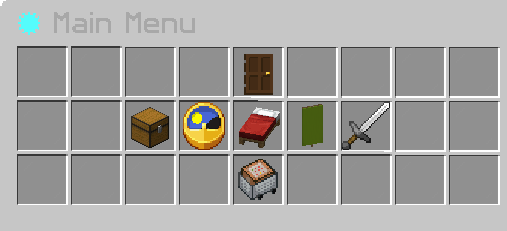
| Gui item | What it does | Details |
|---|---|---|
| Dark oak door | leave team | allows you to leave your team |
| Chest | invites | allows you to view the invites you receive for your team |
| Clock | team stats | view the stats of your team (Level: total XP, money, playtime, kills, deaths, killed mobs, placed blocks, and broken blocks) |
| Red bed | team home | allows you to teleport or set your team home (red bed--teleport; nether star--set home) |
| Green banner | members | allows you to see the list of all members |
| remove member | shift + click on the player head to remove a team member | |
| Iron sword | team allies | allows you to view allies |
| minecart with chest | team settings | open the settings menu for your team |
Team settings opens a separate menu:
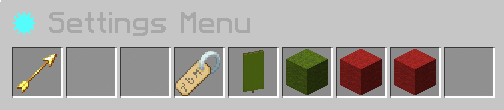
| Gui item | What it does | Details |
|---|---|---|
| Spectral arrow | Go back | opens the previous gui menu |
| Name tag | Team name | hover shows the current team name; clicking on the name tag will allow you to change your team name |
| Green banner | Team tag | shares current team tag (provided by the system originally); clicking on the banner will let you change the team tag |
| Green wool block | Friendly fire | clicking on this will enable team players to hit and do damage to one another -- the wool block will turn red to indicate it's off and green to indicate it is on |
| Red wool block (first) | Disallow teammates to invite people to join the team | only the team owner can invite people to join the team |
| Red wool block (second) | Disallow teammates to teleport to base | even if a base is set, no teammembers can teleport to it. |