
🗺️ Claiming Land
/kit claim
You can randomly travel to leave /spawn with /wild or /rtp Once you find where you’d like to live, make sure you /sethome and use /kit claim so you can claim your base space (this keeps people from stealing or griefing from you).
If you land in a place that you can’t escape, do /trapped or return to /spawn
How to Claim
We advise that you do not build within 150-200 blocks from the nearest base. To check what is around you, you can do /gnear to see the claims near where you are, and you can do /gtoggle to see red particles that show you where their claim may end. If you are not sure even after using these commands, please reach out to a staff member to help!
Once you find where you’d like to live, make sure you /sethome and use /kit claim so you can claim your base space (this keeps people from stealing from you). To claim, check out bit.ly/mcgpuser. Use the golden shovel, and click where you want one corner of your base, and then immediately go to the diagonal/opposite corner of your base, and click with the gold shovel again. Your base will be the rectangular space!
/kit claim can be claimed multiple times, but it does have a cooldown.
To claim, use the golden shovel that comes with /kit claim, and click where you want one corner of your base, and then immediately go to the diagonal/opposite corner of your base, and click with the gold shovel again. Your base will be the rectangular space! Bases need to be at least 100 blocks (10x10 square).
Put a sign on a chest (without crouching) to automatically make your chest private so no one but you and other people you put on the chest can open it
If you do /claim while holding the gold shovel, it will also create a claim around you that is 11x11 blocks.
You can extend your claim by holding the gold shovel, clicking on a corner of your existing base, and clicking on a new block where you want the new corner to be. Your base will automatically resize to that new corner as long as you have the claim blocks for it.
Another way to extend your claim is to stand in your claim, hold the gold shovel, and face the direction you are extending. Then, do /extendclaim #, where the # represents how many blocks you want to extend your claim (for example: /extendclaim 10 will expand your entire claim 10 blocks in the direction you're facing).
Note that if you do not have enough claim blocks, it will not let you create or extend your claim.
Private Chests
For any container (chests, barrels, shulker boxes, furnaces, dispensers, etc.), put a sign on the block. You should not crouch--it will automatically add the sign. It will automatically add [Private] and your line on the second line. You can add others' names to the container to give them access--just add their player names to the 3rd and 4th lines.
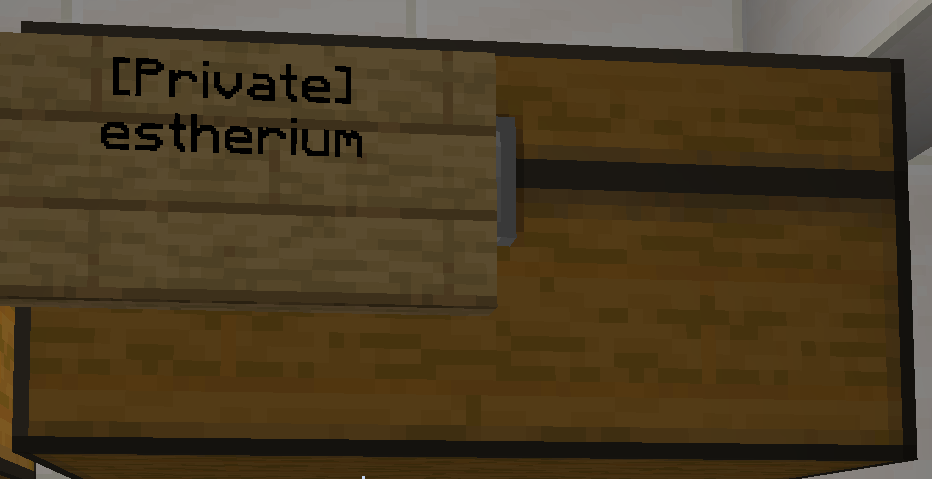
You can add a second sign to the container to add more players.
Private Entrances/Exits
For doors or trapdoors, place a sign on the door, or the block above the door.
Claim Commands
/bfc username Bans player from your claim /abandonclaim Removes the claim that you are standing in (and only that one) /abandonallclaims Removes all your claims (you will need to type it again in the chat box to confirm) /subdivideclaim Changes your claim settings so you can separate your claim into different sections with different /trust permissions /restrictsubclaim The subclaim's permissions will no longer inherit from the parent claim /basicclaims Changes your claim settings from subdivisions to normal claim settings /claimexplosions Turns on TNT and explosion effects on only your claim /claimslist Shows all of your claims in the chat window. If you have a lot of claims, you may need to do /claimslist 2 to see the second page /sethome homename Puts an anchor down so that if you do /home homename, you can go back to that exact spot /home homename Teleports you back to your /sethome /gptplist Shows you a list of all your claims with ID numbers /gptp claimID# Lets you teleport to a specific claim
Earn claim blocks for free by actively playing, /vote (250 for each site), /wb (or /welcomeback gives 50 for each person) /welcome (100 for each person) or check out how to get more.
Still confused about teleporting to your claim?
In chat, if you type /gptplist, you will see something like this:

You can see that RickyLafleur has 2 different claims. The ID numbers are the first number listed. Ricky can get to his claim by entering one of these two commands in chat:
/gptp 34421
/gptp 34422
Still having trouble? Ask a staff member for help!